In my earlier post I had explained in detail how you can change your home screen using adw launcher and how you can download and use adw themes to quickly change the look & feel of your Android phone. I did explain that some of the adw launcher themes are iPhone look alike themes. In case you have missed that post then you can read it at :
How-to apply iPhone theme to Google Android mobile phone using ADW Launcher
I had mentioned in my last post about two kinds of wallpapers for Android, Image Background Wallpapers and Live Wallpapers. Image backgrounds are the traditional wallpapers which we know and "live wallpapers" are the new type of wallpapers which comes with animation effect and are interactive. In this post also I am covering traditional wallpapers and I may cover live wallpapers in some future posts. But you need not wait and you can download coolest live wallpapers available in Google's Android market and other Android app stores.
In this post I am going to cover the second wallpaper app from this series of three coolest apps which you can use to download free and coolest wallpapers for your Google Android phone.
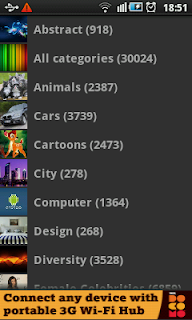
HD Wallpapers App : This is another simple and best wallpapers app which you should give a try at. It is simple to use and provides most of the basic functions which we need to search and find best and cool wallpapers for Android phone. Again the best part is, it is absolutely free. You can find this Wallpaper app in Google Android market or your favorite Android app store with ease. Once you install this app on your phone then you are ready to go and start looking for coolest wallpapers available out there. When you run the HD Wallpapers app then it displays it's main screen with various wallpaper categories as shown below.
 |
| HD Wallpapers Main Screen |
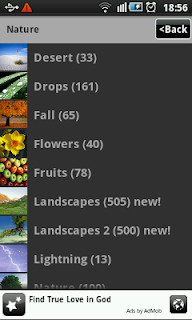
You can see that there are many interesting categories of wallpapers namely Abstract, Animals, Cars, Cartoons, City, Computer, Design, Diversity, Female Celebrities, Gaming, Love, Machines, Male Celebrities, Movie, Music, Nature, New and Sports. If you tap any of the category then you would find more sub categories within that main category of wallpaper. For example when you tap the Nature category, you would find more categories as given in screenshot below.
 |
| HD Wallpapers - Nature Wallpapers |
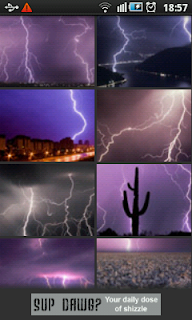
You can see that within main wallpaper category Nature there are sub categories like Desert, Drops, Fall, Flowers, Fruits, Landscapes, Lightning, Nature Water, Rainbow, Space, Trees, Underwater, Waterfall, Winter and more. Each category has collection of beautiful, coolest and breathtaking Android wallpapers that you would love to have. The collection of beautiful and coolest wallpapers from Lightning sub category are shown in screenshot below.
 |
| HD Wallpapers - Lightning Wallpapers |
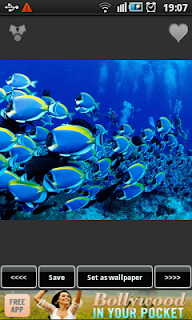
You can see how beautiful these wallpapers are and probably it is difficult to decide which one to download. You can tap the wallpaper you like from the thumbnail view shown above to enlarge it. Just to give you an idea how an enlarged wallpaper looks like on android phone screen, one of the coolest wallpapers from underwater category is displayed in enlarged size in screenshot below.
 |
| HD Wallpapers - Underwater wallpaper |
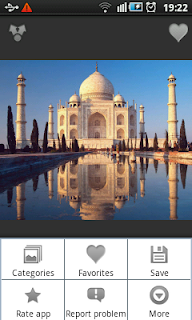
This underwater wallpaper looks awesome, isn't it? On this screen there are various icons and buttons which can be used to perform various activities. Lets start with icon at top left hand corner of the screen. You can tap this icon to send this wallpaper using various options like bluetooth, email etc. The heart shape icon at top right hand corner of the screen allows you to mark this wallpaper as your favorite. This could be very useful when you are not able to decide which wallpaper to use and you want to see more coolest wallpapers before you decide on one. Save button at the bottom of the screen allows you to save the wallpaper on your Android phone SD card. "Set as wallpaper" button just sets the given wallpaper as your phone's wallpaper. Other two buttons at bottom of screen are to see the previous or next wallpaper from the available collection. On enlarged wallpaper screen, when you press menu button of your Android phone then you would see the app menu as shown below.
 |
| HD Wallpapers - Menu |
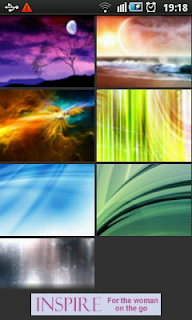
"Save" menu from these app menus perform the same action as that for Save button we seen earlier. Categories menu takes you back to list of wallpaper categories. Rate app and Report problem menus does exactly what they say. More menu provides few more useful menus which you may would like to try out. When you tap "Favorites" menu then it takes you to the favorite wallpapers screen where you can see all the wallpapers which you have marked favorite using heart shaped icon explained earlier. Example favorite screen is shown below.
 |
| HD Wallpapers - Favorites |
The wallpapers displayed in favorites would depend on what you have marked as favorite. If you don't mark any wallpaper as your favorite then this list would be empty. You can see few beautiful and coolest wallpapers in above favorite screenshot. So far you have seen many cool and awesome wallpapers which are available with HD wallpapers app. You must have also noticed that there are plenty of different categories and choices for you with HD wallpapers app. If you are looking for any specific wallpaper then most likely you would find it using HD Wallpapers app.
 |
| Advertisement - HTC Screen Protector |
So that is second of the coolest three wallpaper apps for your Google Android phone. You can use these wallpapers for all android phones, be it HTC, Samsung, Motorola or any other brand in market. Just a suggestion, don't download app .apk file from untrusted sources. Instead you can download HD Wallpapers app from android market or any of your trusted android app store. Once you install wallpapers app then you can start downloading coolest wallpapers for your android using the app. In coming posts I would be covering third of three best wallpaper apps. Keep checking back for more exciting, best and coolest Android apps.

 HD Wallpapers App : This is another simple and best wallpapers app which you should give a try at. It is simple to use and provides most of the basic functions which we need to search and find best and cool wallpapers for Android phone. Again the best part is, it is absolutely free. You can find this Wallpaper app in Google Android market or your favorite Android app store with ease. Once you install this app on your phone then you are ready to go and start looking for coolest wallpapers available out there. When you run the HD Wallpapers app then it displays it's main screen with various wallpaper categories as shown below.


